
Reimbursements and Ramp#
Our fiscal sponsor, CS&S, use a service called Ramp to handle all of our project billing and connect it with our grants.
If you’d like access to our Ramp account or need to use it, reach out to one of these people.
You can use the organization credit card
We have an organizational credit card to purchase things directly with 2i2c funds if you do not wish to file a reimbursement yourself. To do this, contact the
Executive Directoror thePartnerships Lead.If you attempt to use the card and it is blocked or declined, alert the team via the Slack #team-updates channel. That’s a problem that needs immediate attention.
We do all of our reimbursements via our fiscal sponsor, CS&S. There is a different process for employees vs. contractors, see below for more details.
Where should I ask questions about reimbursement?#
If you’ve got a question about Ramp and reimbursement policy, send an e-mail to the CS&S team.
What can be reimbursed?#
We reimburse team members that take on expenses as part of doing their work, provided that these expenses are aligned with the mission and goals of 2i2c. Any reimbursement request will need to be approved by either CS&S or 2i2c’s Executive Director.
A good rule of thumb is to ask before you purchase something that you plan to reimburse in the future. As we understand our regular costs we will build a more sophisticated policy for what kinds of things can be reimbursed.
Currently, these are the expenses that we regularly reimburse:
Monthly / annual fees for online services that are used across the entire 2i2c team.
Cloud infrastructure costs incurred as part of our services.
Conference registration for conferences that we agree are in-scope for 2i2c’s attendance.
Travel: see Travel reimbursements.
Personal development / books / training for skills that are directly related to team responsibilities.
Infrequent equipment purchases for team members (computers, desks, etc) provided they are within a reasonable spend amount.
Travel reimbursements#
Below are a few guidelines for travel reimbursements with 2i2c:
2i2c will cover the costs of:
Travel to and from the event.
Lodging for the day before or after.
Any legal work that needed to be done to allow you to travel (e.g., VISA fees).
Extra hotel days or travel change fees that were required for health reasons (e.g. testing positive for COVID and needing to extend the stay).
A few notes to help clarify:
For international travel, we can cover an extra day before to give more time to adjust.
It is fine if you are arriving / leaving from two different locations (e.g., if you intend on making a side-trip after the event). In this case, 2i2c will only cover the trip to / from the event, not the third leg.
Try to find less-expensive tickets / housing if possible, but don’t strongly inconvenience yourself as a result.
If it’s important to stay earlier or later, ask the
Executive Directorand we might be able to make an exception.
Reimbursement for employees#
If you’re an employee, you can request a reimbursement via an invoice. To do so, see Send invoices to CS&S.
Reimbursement for contractors#
To reimburse expenses as a contractor, submit a separate line item on your monthly invoice, called Reimbursement - <item>.
If you paid the expense in a currency other than USD, please convert it to USD using the daily conversion rate.
Receipts in a different currency are permitted so long as the numbers roughly correctly map onto each other given rates in the recent past.
See Send invoices to CS&S for instructions on how to submit an invoice.
This must be written into your contract
We need to include the following language in your contract to make this legal:
Expenses: Organization agrees to reimburse Independent Contractor for all expenses reasonably incurred in the performance of the Engagement and approved by Organization in advance, upon presentation of supporting receipts and documentation.
Reimbursements with our 2i2c credit card#
If you purchase something with our 2i2c credit card, the transaction will show up in Ramp. We must match the receipt for your purchase with the new entry in Ramp. Here are the instructions to follow.
Make the purchase.
E-mail the receipt (PDF or a forwarded e-mail) to
receipts@2i2c.org.Our
Executive Assistantwill check this address weekly and match new receipts with entries in Ramp.Answer any questions that they ask you to help match the receipt to the right entry.
Matching receipts to entries in Ramp#
For Ramp admins only!
These instructions are for someone with Administrator privileges in our Ramp account.
This is generally done by our Executive Assistant but may be done by anybody with these permissions in Ramp.
Here is the process that we follow:
Go to the Ramp inbox. This should list any items that need action from you or others.
If it is empty, then there’s nothing to do!
If it has items for Review, click on each one and follow the prompts to include any important missing information.
Go to the Google Group inbox for
receipts@2i2c.organd see if the receipt for a Ramp entry exists there.The URL for this Google Group has this form:
https://groups.google.com/u/{GOOGLE-USER-NUMBER}/a/2i2c.org/g/receipts
Where
GOOGLE-USER-NUMBERis the number associated with your2i2c.orgGoogle account on your local machine. For example, my first Google Account is0, my third is2.If there is no obvious receipt in the
receipts@2i2c.orginbox, ask the team for guidance in#team-updates.
Send receipts to Ramp via e-mail#
For Ramp admins only!
These instructions are for someone with Administrator privileges in our Ramp account.
Ramp has the ability to automatically scan receipts via e-mail and attach them to purchases. This can drastically speed up the process of approving recurring transactions.
Make a purchase with our Ramp.com card.
Use an e-mail that is attached to our ramp.com account.
Receive an e-mail with a receipt (e.g. as an attached PDF, or in-line text).
Forward the e-mail to
receipts@ramp.com.
Ramp should scan the e-mail and automatically attach the receipt to the proper expense. See the Ramp receipt detection documentation for more details.
Cloud reimbursements#
We must follow a few extra steps to reimburse our cloud bills. CS&S requires invoices (not a receipts) for cloud costs.
We document how to find each of these for our cloud providers below.
Google Cloud Platform (GCP)#
Use the Google Cloud Console UI to find invoices for previous months. In GCP “invoices” are called “statements”. To find a statement for a month, follow these steps:
First, go to console.cloud.google.com.
Double-check that you’re signed in with your @2i2c.org account.
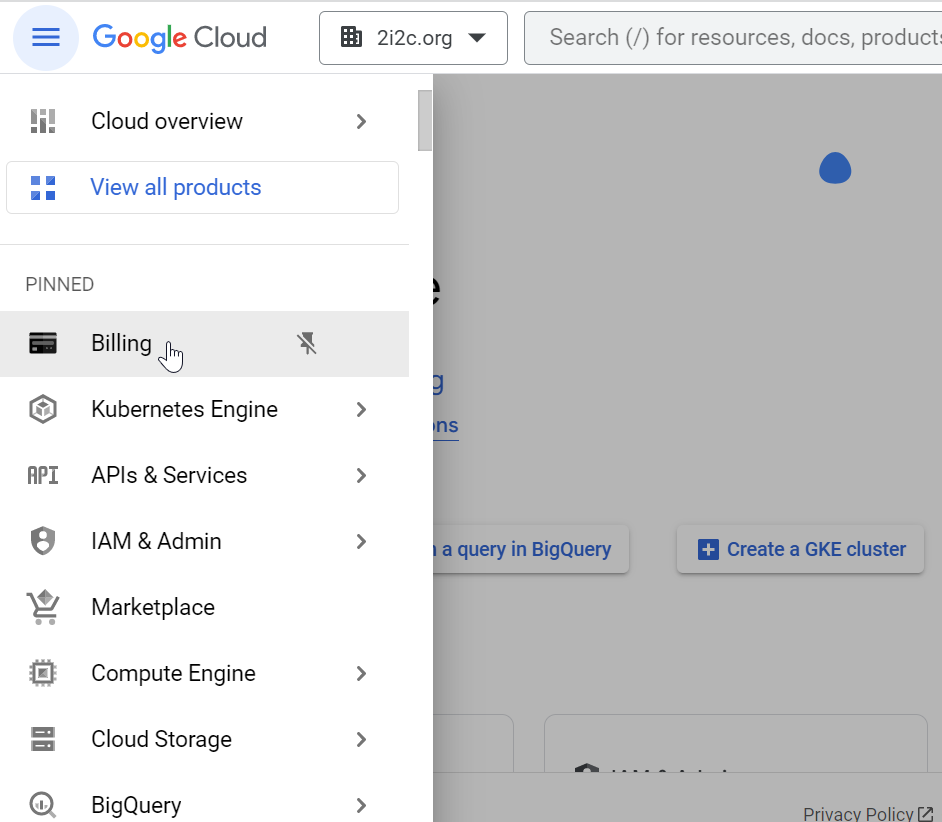
Click on Billing in the hamburger menu.
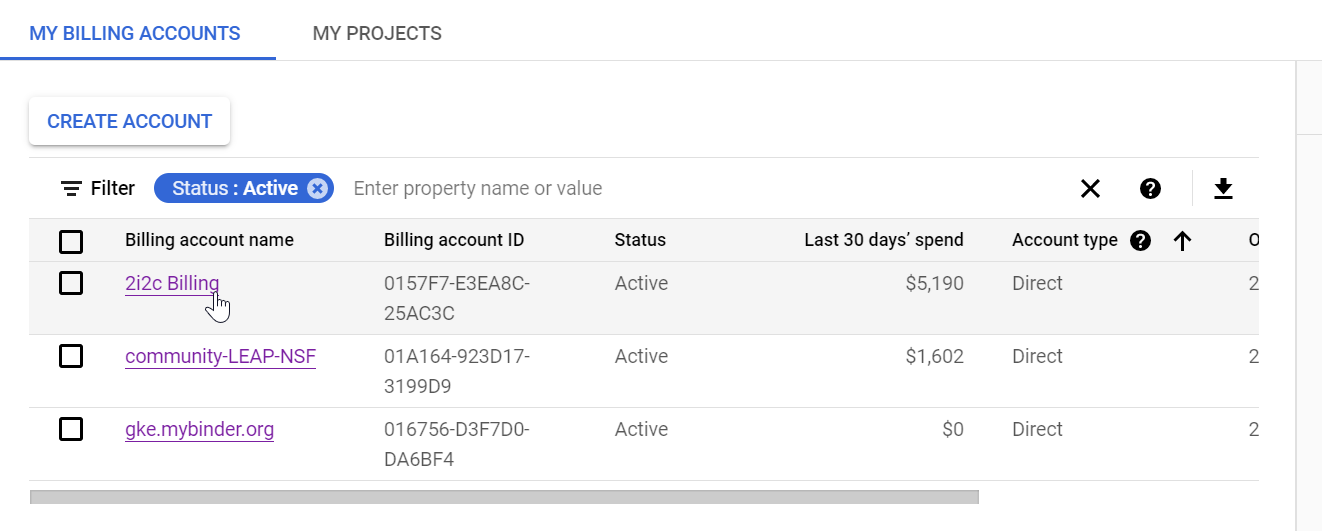
Click the billing account name you need an invoice for.
Our default billing account is called 2i2c Billing.
This is where the majority of our cloud costs come from on GCP.
Some project-specific billing accounts are usually listed as well.
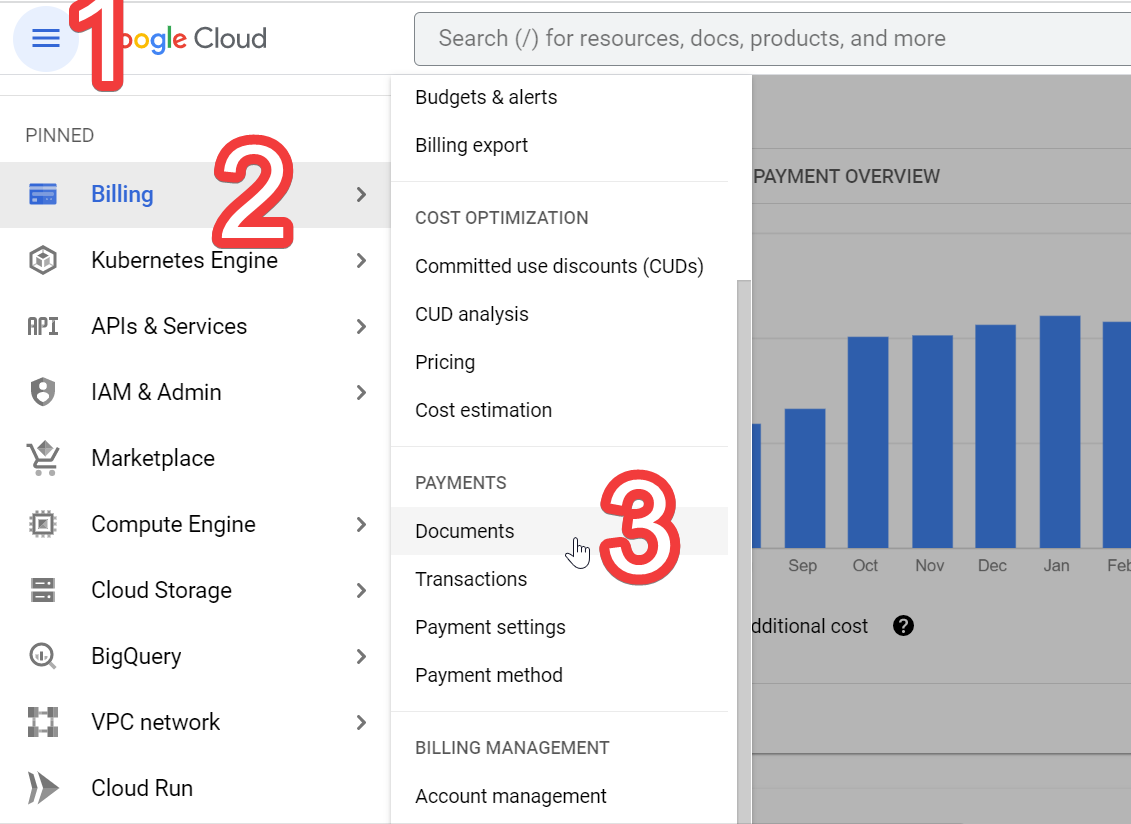
In the left menu, scroll down to the Payments section and click Documents.
Check the box next to the month you want, and then click Download selected.
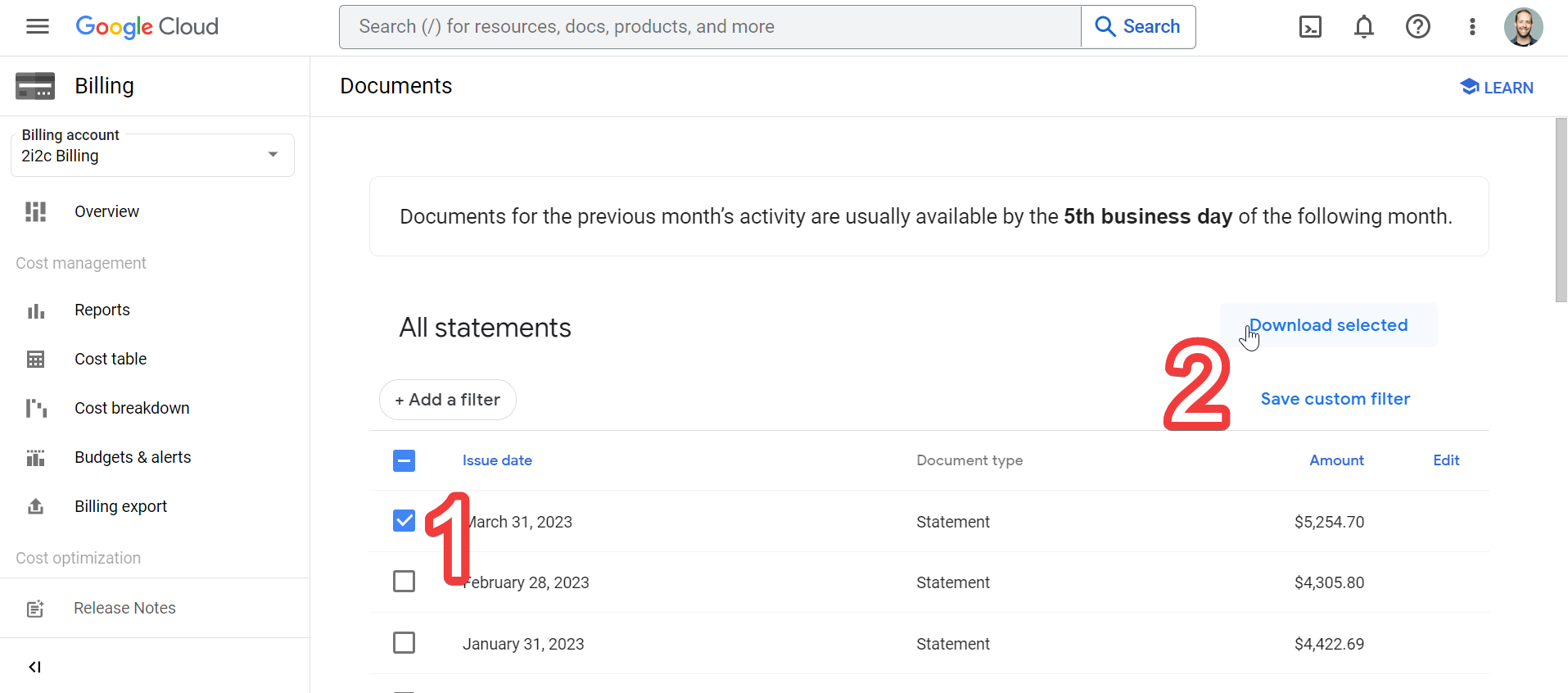
This PDF is the statement (invoice) that you will upload to the corresponding Ramp.com transaction.
Look for the Ramp.com transaction that corresponds to this invoice. You can do so by finding the Google Cloud transactions that are “flagged for review” (because it is missing an invoice), and cross-reference the total charged amount.
Warning
Some Google Cloud Billing Accounts will split a monthly cost into multiple transactions. For example, some accounts have an “automatic charge at $1,000” trigger. In this case, find multiple transactions that add up to the amount of the monthly invoice.
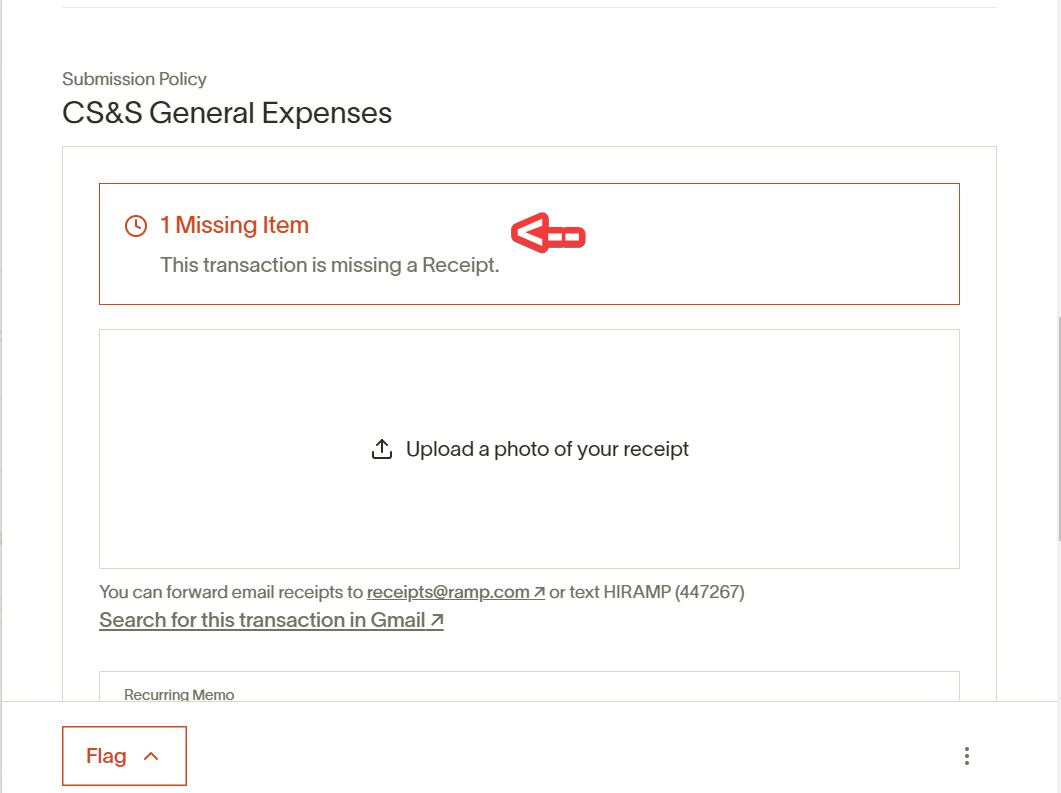
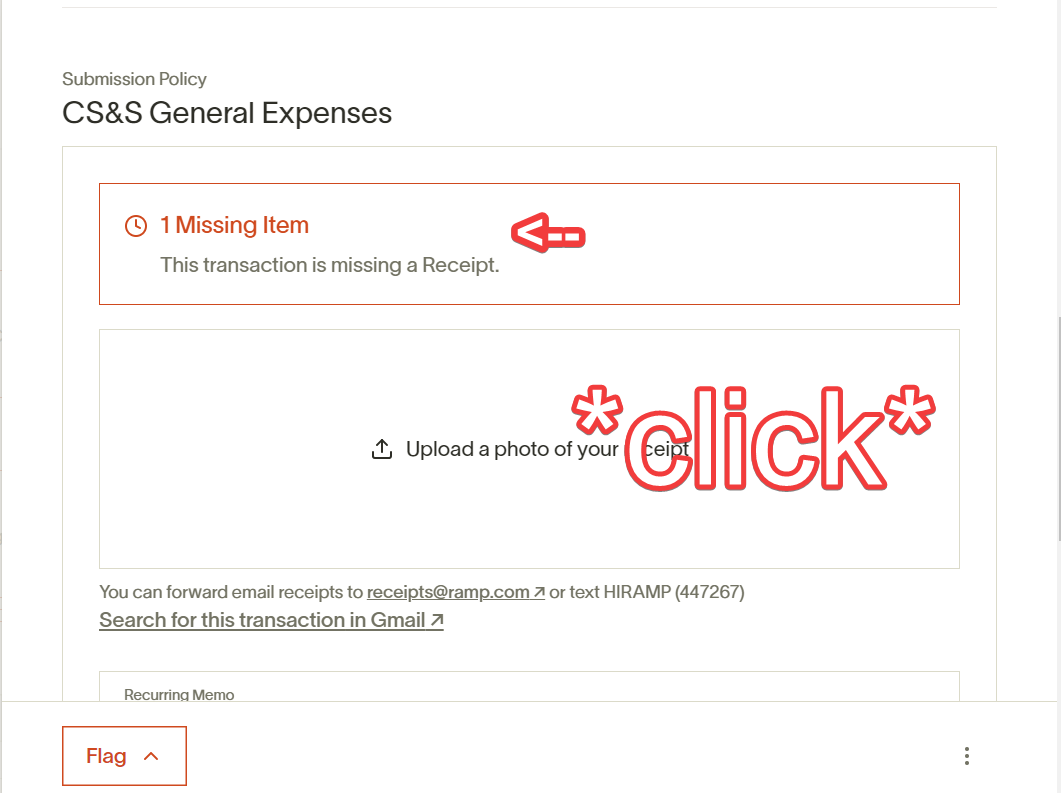
Upload the PDF to the receipt section of this transaction.
Amazon Web Services (AWS)#
AWS automatically e-mails cloud account admins a PDF of their monthly invoice.
Chris Holdgraf’s e-mail account is set up to automatically forward this e-mail to receipts@ramp.com, and this will automatically match the PDF with the corresponding charge in our Ramp account.
Chris’ account also automatically forwards this e-mail to receipts@2i2c.org, so if we must manually upload the receipt for some reason, find the e-mail with the PDF in the Google Group for that e-mail account.
The receipts@2i2c.org address#
We have a shared Google Group account at receipts@2i2c.org.
We use this to collect receipts by team members that have used one of the 2i2c credit cards.
By having all of our receipts in a centralized place, we can delegate the responsibility of matching receipts to Ramp entries.
Currently, our Executive Assistant checks all new Ramp entries each week and matches them with receipts that are in receipts@2i2c.org.